> For the complete documentation index, see [llms.txt](https://docs.probloggertemplates.com/guides/llms.txt). Markdown versions of documentation pages are available by appending `.md` to page URLs; this page is available as [Markdown](https://docs.probloggertemplates.com/guides/casper/getting-started/header-menu.md).
# Header Menu
Access your blog **Layout** > and click on the **Edit Icon** > in the **Header Menu** gadget.
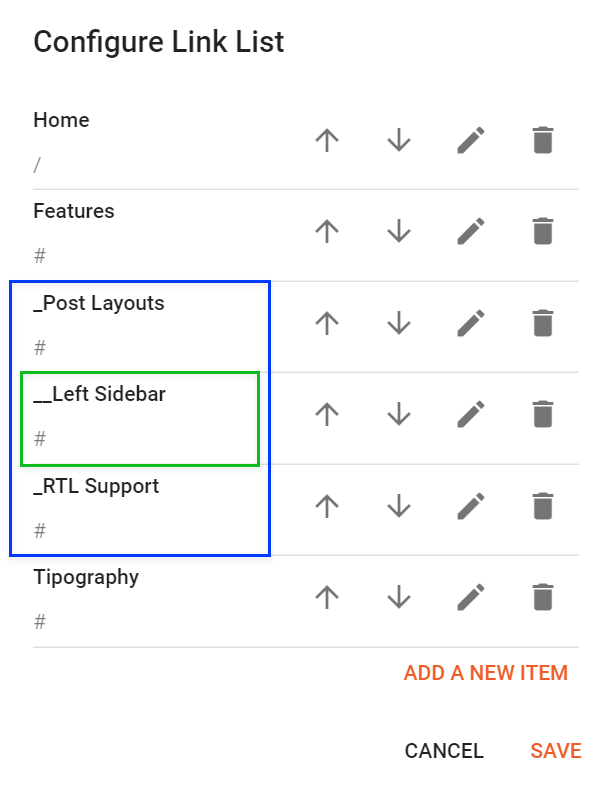
### Default Links and Sub Links
Default Link Example: `Features`
SubLink Level 1 Example: `_Level 1` “Before the Title add 1 underscore”
SubLink Level 2 Example: `__Level 2` “Before the Title add 2 underscore”
**Example:**
{% hint style="info" %}
INFO: Level 2 Links must be between or below level 1 links.
{% endhint %}
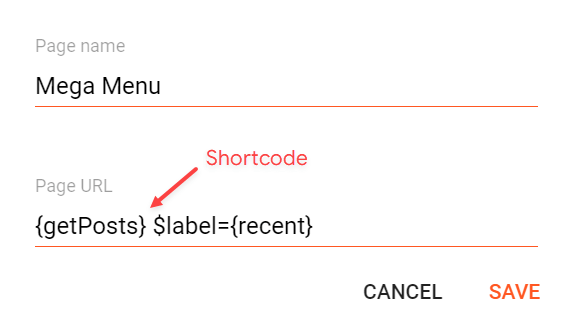
### Mega Menu
Shortcode: `{getPosts} $label={Your Label}`
Label Options: `Label Name` or `recent`
#### What are Label Name?
**Example:**
In this type the attribute `$type={}` is not required.
{% hint style="success" %}
SAVE: After adding all the desired links and organizing them in the correct position, click on the Save Button.
{% endhint %}