> For the complete documentation index, see [llms.txt](https://docs.probloggertemplates.com/guides/llms.txt). Markdown versions of documentation pages are available by appending `.md` to page URLs; this page is available as [Markdown](https://docs.probloggertemplates.com/guides/smartmag/getting-started/about-section.md).
# About Section
Access your blog **Layout** > and click on the **Edit Icon** > in the **About Section** Info gadgets.
### About Us
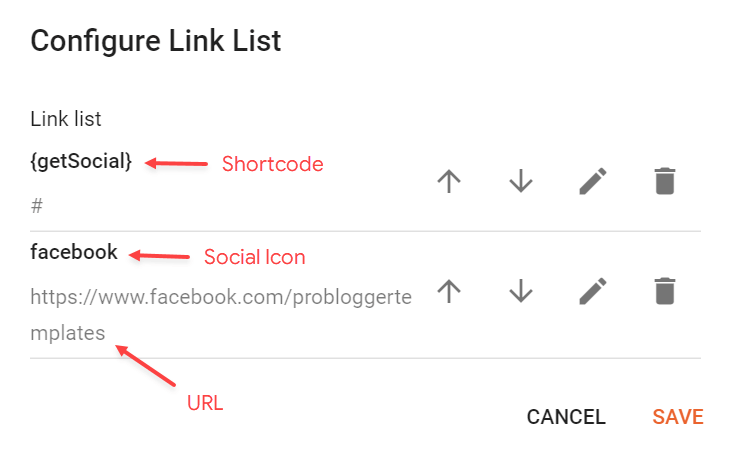
### Social Icons
Supported Icons: `google`, `blogger`, `apple`, `amazon`, `microsoft`, `facebook`, `facebook-f`, `twitter`, `twitter-x`, `x`, `rss`, `youtube`, `skype`, `stumbleupon`, `tumblr`, `vk`, `stack-overflow`, `github`, `linkedin`, `dribbble`, `soundcloud`, `behance`, `digg`, `instagram`, `pinterest`, `pinterest-p`, `twitch`, `steam`, `delicious`, `codepen`, `flipboard`, `reddit`, `whatsapp`, `telegram`, `messenger`, `snapchat`, `discord`, `quora`, `tiktok`, `email`, `share`, `threads`, `mastodon`, `external-link`
Shortcode: `{getSocial}`
{% hint style="info" %}
INFO: An item with the shortcode must be added for the Gadget to work correctly.
{% endhint %}
**Example:**