> For the complete documentation index, see [llms.txt](https://docs.probloggertemplates.com/guides/llms.txt). Markdown versions of documentation pages are available by appending `.md` to page URLs; this page is available as [Markdown](https://docs.probloggertemplates.com/guides/spotlight/getting-started/post-cards.md).
# Post Cards
This function is available for posts and pages and allows you to add recommended posts, downloads, products and even custom calls to action.
Shortcode: `{getCard} $type={Card Type} $title={Card Title} $info={Card Info} $button={Button Text} $icon={Icon Code}`
Card Type: `post`, `download`, `product`, `custom`
Card Title: Attribute compatible with all card types, being optional for the `post` type.
**Example:**
The cards are highly flexible, being able to support specific and unique attributes or even optional attributes.
### Post Type
Shortcode: `{getCard} $type={post} $title={Card Title}`
Card Link: For this card to work properly, a link to a post must be provided.
**Card Demo:**
### Download Card
Shortcode: `{getCard} $type={download} $title={Card Title} $info={Card Info} $button={Button Text}`
Card Link: Add any link whether internal or external.
**Card Demo:**
Product Card Shortcode: `{getCard} $type={product} $title={Card Title} $info={Card Info} $button={Button Text}`
Card Link: Add any link whether internal or external.
**Card Demo:**
Custom Card Shortcode: `{getCard} $type={custom} $title={Card Title} $info={Card Info} $button={Button Text} $icon={Icon Code}`
Card Link: Add any link whether internal or external.
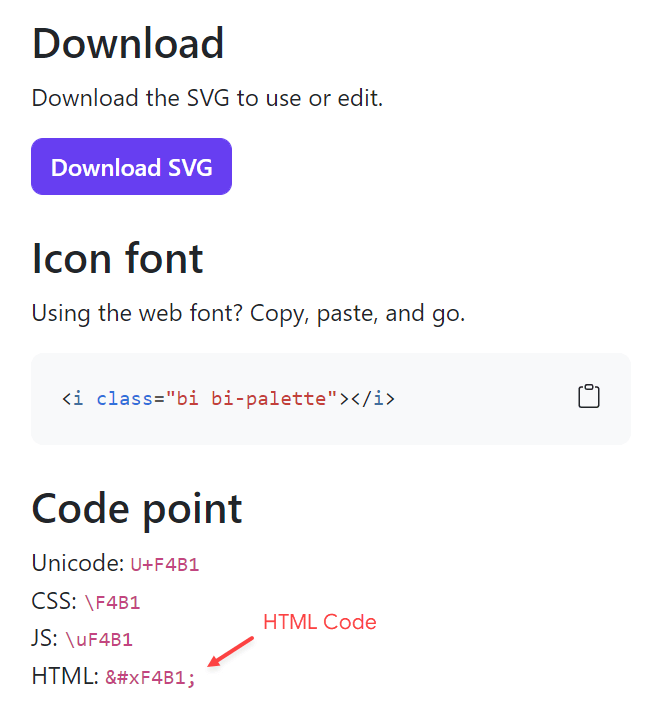
Icon Code: This template uses **Bootstrap Icons** as the main icon source, so you can choose from thousands of awesome icons to use on your card.
{% stepper %}
{% step %}
Go to the [Bootstrap Icons Gallery](https://icons.getbootstrap.com/).
{% endstep %}
{% step %}
Search for the desired icon, then click on the icon to access the info page.
{% endstep %}
{% step %}
Copy the **HTML Code** available in the **Code Point** section as illustrated in the image below.
{% endstep %}
{% endstepper %}
{% hint style="info" %}
INFO: When editing the shortcode the icon attribute should look like `$icon={}`
{% endhint %}
**Card Demo:**


 {% endstep %}
{% endstepper %}
{% hint style="info" %}
INFO: When editing the shortcode the icon attribute should look like `$icon={}`
{% endhint %}
**Card Demo:**
{% endstep %}
{% endstepper %}
{% hint style="info" %}
INFO: When editing the shortcode the icon attribute should look like `$icon={}`
{% endhint %}
**Card Demo:**
